Key Points (Quick Answers)
- Q: Burn-in aur image retention same hai? → A: Nahin—retention temporary hota, burn-in uneven pixel wear se hota.
- Q: “Permanent hai kya?” → A: Retention often chali jaati; true burn-in usually permanent rehta hai.
- Q: OLED burn-in prevention ka golden rule? → A: Static cheezein (logo/HUD) ko hours tak same jagah mat rakho.
- Q: News channels safe hain? → A: Haan, bas roz long hours same ticker/logo ko avoid karo.
- Q: Gaming (PS/Xbox) risky hai kya? → A: Normal gaming theek; same HUD + high brightness + long sessions risky.
- Q: Sabse important settings kaunsi? → A: Pixel/Screen Shift ON, logo dimming ON, aur screen saver ON rakho.
- Q: Pixel Refresher/Panel Refresh kab chalana chahiye? → A: Jab retention dikhe ya TV bole—baar-baar manual mat chalao.
- Q: Ghost image on TV dikhe to pehle kya? → A: 10–20 min full-screen mixed content chalao, phir dobara check karo.
- Q: Settings jaldi kaise dhoonde? → A: “Panel Care / OLED Care” aur “Pixel Refresh/Cleaning/Panel Refresh” jaisa option search karo.
- Q: Kab technician ko call karein? → A: 7–10 din me shadow same rahe, ya normal viewing me disturb kare.
Quick Decision Box
- “Grey screen pe faint logo kabhi-kabhi? → Likely image retention (temporary).”
- “Same logo roz clearly fixed? → Burn-in risk high.”
- “Refresh/cleaning feature ke baad bhi same shadow? → Possible permanent burn-in.”
Skip to: Burn-in vs retention – Risk habits – Best settings (Brand cheat sheet) – Gaming/news tips – If already visible – Myths – FAQ
Aajkal OLED TV pe news logo, cricket scorecard, YouTube pause screen, ya game HUD… inme se koi bhi cheez agar same jagah pe baar-baar ruki rahe, to ek halka sa shadow/ghost image feel ho sakta hai—aur ghar me turant tension start.
Relax. OLED burn-in prevention possible hai—bas thode sensible habits aur kuch safe settings se risk kaafi control me aa jaata hai. Is guide me wahi practical cheezein hain jo Indian homes me actually kaam karti hain, aur jo Ravi Electronics me daily customers ko samjhaate hain.
Quick answer: OLED burn-in se bachna possible hai?
Haan, kaafi hadd tak possible hai—agar aap static logos/tickers/HUD ko daily long hours tak same position pe chalne nahi dete. OLED me issue “usage pattern” se zyada aata hai, isliye brand chahe koi bhi ho, basics almost same hi rehte hain.
Burn-in hota kya hai? (Simple explanation)
OLED me har pixel khud light deta hai, aur jab screen ka ek part (jaise corner ka channel logo) baaki screen ke comparison me zyada time bright chalta rehta hai, to wahan ke pixels thode zyada wear ho jaate hain. Isi uneven wear ki wajah se kabhi-kabhi background change hone par bhi wahi shape faint si nazar aati hai.
Plasma TVs me bhi aisa hota tha, isliye old plasma users ko “image retention” wali feeling familiar lagti hai; bas OLED me protection features zyada smart aur automated ho gaye hain.
Burn-in vs Image Retention — difference kya hai?
Image retention usually temporary hota hai, jabki burn-in long-term uneven pixel wear ka result hota hai. Ghar pe simple rule: agar shadow thodi der me fade ho jaaye, to retention; aur agar days tak same jagah chipka rahe, to burn-in risk.
Quick pointers (easy language):
- Image retention (temporary): Long session ke baad grey/white type screen pe halka sa ghost dikhna, jo mixed content se gradually kam ho jaata hai.
- Burn-in (more permanent): Same logo/scoreboard ka shadow har content me same position pe repeat hona, even after days.
Safe quick check (panic-free): 10–15 minutes full-screen moving content chalao (no logos), phir YouTube pe “solid grey screen” laga kar dekho; agar same spot pe same shape baar-baar dikh rahi hai, to note kar lo.
Top 10 risk habits (Indian home examples)
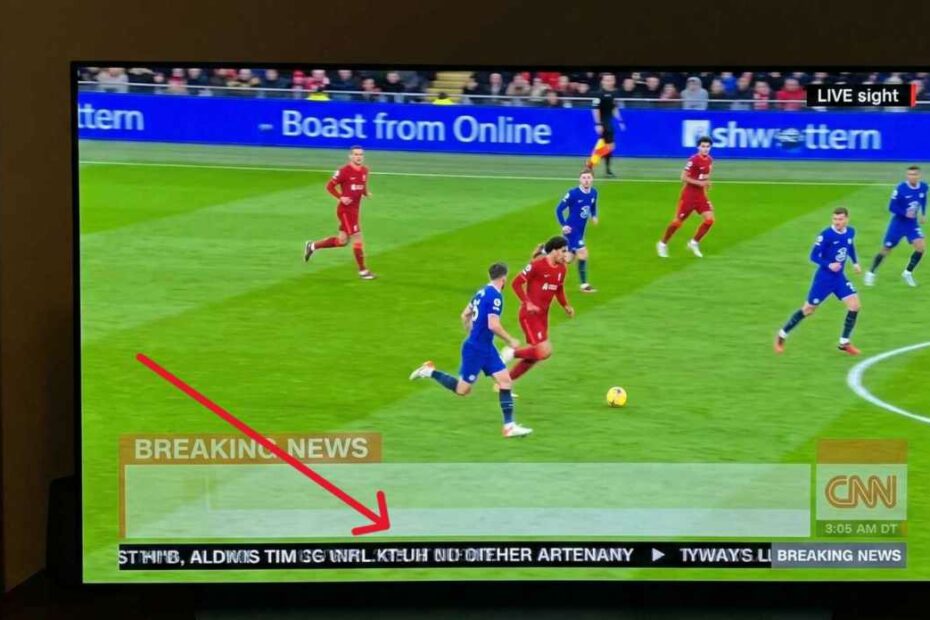
- News channel poora din chalna: Isme corner logo aur neeche ticker fixed rehta hai, isliye same area pe daily load badhta hai; better yeh hai ki beech-beech me content switch karo, brightness moderate rakho, aur logo dimming ON rakho.
- Cricket/sports score overlay ko hours tak daily dekhna: Scoreboard almost same jagah rehta hai, especially highlights loop me; match ke baad 10–15 min mixed content chala dena simple, effective habit hai.
- YouTube/OTT ko pause karke chhod dena: Pause UI aur thumbnails static hote hain, aur kids ghar me ye sabse common mistake karte hain; screen saver + auto sleep timer yahan hero ban jaata hai.
- Set-top box (DTH) ka home screen on reh jaana: Bright banners aur boxes static hote hain; agar TV background me “chalta rahe” habit hai, to auto power off set karo.
- Gaming me same HUD-heavy game, long sessions: Health bar/minimap/crosshair ek hi spot pe chipke rehte hain; game settings me HUD opacity/auto-hide mile to use karo, aur 60–90 min me short break lo.
- Always ‘Vivid/Dynamic’ mode use karna: Ye mode brightness ko unnecessarily push karta hai; daily viewing ke liye Standard/Cinema/Filmmaker type modes zyada sane hote hain.
- Same YouTube music channel with static logo/visualizer: Visualizer/branding same jagah rehta hai; playlist rotate karo, ya full-screen visuals change kar do.
- Always-on gallery/clock type features: Ye basically static elements ko long time screen pe rakhte hain; agar zaroorat nahi, to off rakho.
- TV ko “background noise” ke liye ghanton on rakhna: Cumulative hours badhte hain, aur static elements ka exposure bhi; better audio-only solution phone/speaker ho sakta hai.
- Manual refresh/cleaning ko baar-baar run karna: Ye “dawai” jaisa hai—need ho tabhi; daily/weekly chalana smart habit nahi.
Top 12 best settings for OLED burn-in prevention
- Pixel Shift / Screen Shift ON rakho (screen ka subtle move normal hai).
- Logo dimming / Adjust Logo Brightness / Logo Luminance Adjustment ON rakho, especially news lovers ke liye.
- Screen Saver ON rakho (YouTube/OTT apps me life easy ho jaati hai).
- Auto Power Off / Sleep Timer ON rakho—night viewing me best protection.
- Brightness ko “comfortable” level pe rakho, har time max pe nahi.
- Store/Demo mode OFF confirm karo (new TV me kabhi-kabhi on hota).
- Picture mode wisely choose karo: Movies ke liye Cinema/Filmmaker; daily TV ke liye Standard; Dynamic sirf kabhi-kabhi.
- Gaming me HUD settings optimize karo: opacity low, auto-hide, ya minimal HUD (game support kare to).
- OTT home screens pe TV mat chhodo: Netflix/YouTube home pages static tiles hote hain.
- Long static session ke baad 10–15 min mixed content chala do (full-screen, moving visuals).
- TV ko remote se off karke plugged rehne do so it can run its background panel care cycles.
- Pixel Refresher / Pixel Refresh / Panel Refresh manual tabhi run karo jab retention dikhe ya TV prompt kare.
Brand Menu Cheat Sheet (Find these settings fast)
Menu names model aur software update ke hisaab se thode change ho sakte hain—closest matching label dhoondh lo.
- LG OLED (webOS): “OLED Care / OLED Panel Care” aur “Pixel Refresher / Pixel Cleaning” jaise labels milte hain.
Path example: Settings → General → OLED Care → OLED Panel Care → Pixel Cleaning.
Protection features me “Screen Shift” aur “Logo Luminance Adjustment / Adjust Logo Brightness” type wording bhi common hoti hai. - Sony BRAVIA OLED (Google TV/Android TV): “Expert panel settings” ke andar “Panel Refresh” option aata hai.
Path example: Settings → Display & Sound → Expert panel settings → Panel Refresh (exact wording vary ho sakta).
Sony-style caution: Panel Refresh ko too frequently run mat karo; TV prompts/manual guidance follow karna best hota hai. - Samsung OLED (Tizen): “Panel Care” ke andar “Pixel Shift”, “Adjust Logo Brightness”, aur “Pixel Refresh” milta hai.
Path example: Settings → All Settings → General & Privacy → Panel Care → (Pixel Shift / Adjust Logo Brightness / Pixel Refresh). - Panasonic OLED (My Home Screen / Fire TV variants): Panasonic me “Panel Maintenance” ya “Panel maintenance message” type wording milta hai.
Path example (documented): Menu → Picture → Screen Settings → Panel maintenance message.
Panasonic OLED Fire TV models me bhi “Panel Maintenance” settings me hota hai, bas path UI ke hisaab se change ho sakta hai. - Philips OLED (Google TV): Philips me “Clear residual image” option milta hai.
Path example: Settings → Display & Sound → Screen → OLED SCREEN SETTINGS → Clear residual image.
Philips documentation me yeh bhi caution hota hai ki “Clear residual image” ko too often manually karne se OLED display life reduce ho sakti hai—so only when needed. - Other major + Tier-2 brands (India): TCL, Hisense, Xiaomi/Mi, OnePlus, Vu, iFFALCON, Toshiba, aur similar: In brands me exact label model-wise change hota hai, isliye exact naam invent mat karo.
Generally yahi options dhoondo: Panel Care, Screen Protection, Pixel Shift, Clear residual image, Screen Saver, Auto Power Off; many Google TV models me yeh Settings → Display & Sound → Screen / Screen Saver / Power ke aas-paas mil jaata hai (labels vary).
Gaming & sports: enjoy kaise karein without tension?
Haan, bilkul enjoy karo—bas goal yeh hai ki “same static HUD + high brightness + very long daily sessions” wala combo na banne do.
- Break rule: Har 60–90 minutes me 5 minutes ka break, aur break me static pause screen pe mat chhodo—content change ya TV off.
- HUD control: Game allow kare to HUD opacity kam, mini-map auto-hide, ya minimal HUD use karo.
- Sports lovers: Match ke baad thoda mixed content chala do, aur Dynamic/Vivid mode ko habit mat banao.
- Kids rule (simple): “Pause karke chhodna mana hai”—ye ek rule half problems solve kar deta hai.
If you already see a faint logo/ghost image — ab kya karein? (step-by-step)
Pehle calm. Kaafi cases me yeh temporary image retention hoti hai, especially agar abhi-abhi long session hua ho.
- Same channel/game/app turant switch karo.
- 10–20 minutes full-screen mixed content chalao (no tickers, no logos).
- Next 2–3 days brightness thodi moderate rakho, especially night me.
- TV ko remote se properly OFF karo, aur plug/mains on rehne do (background maintenance cycles help kar sakte hain).
- Next day grey screen test se check karo: shadow same jagah same shape me hai ya nahi.
- Agar TV me Pixel Refresher / Pixel Refresh / Panel Refresh / Clear residual image option hai, to sirf ek baar run karo, phir observe karo.
- Agar 7–10 din me bhi same shadow clear rahe, ya normal viewing me disturb kare, to inspection useful hota hai (warranty period me especially).
Kya burn-in repair ho sakta hai? (honest technician answer)
True permanent burn-in usually “repair” nahi hota, kyunki pixels ki wear already ho chuki hoti hai; proper fix technically panel replacement hi hota hai. Practical side yeh hai ki kabhi-kabhi refresh + settings se visibility thodi kam feel ho sakti hai, lekin isme guarantee expect mat karo.
Agar shadow very faint hai aur real content me notice nahi hota, to it’s often better to focus on prevention habits instead of over-treating the panel.
Myth vs Reality (5 quick points)
Myth 1: “OLED me burn-in 100% ho hi jaata.”
Reality: Mixed usage aur right settings ke saath risk manageable hota hai; extreme static usage me risk badhta hai.
Myth 2: “Manual refresh daily chala do, problem khatam.”
Reality: Overuse smart nahi; mostly TV ke auto care cycles pe rely karo, manual sirf need pe.
Myth 3: “Sirf news se burn-in hota.”
Reality: News, sports overlays, gaming HUD—sab static elements risk badha sakte hain.
Myth 4: “Brightness kam karne se picture bekaar ho jaati.”
Reality: Moderate brightness + correct picture mode usually zyada comfortable aur safer hota hai.
Myth 5: “Software se permanent burn-in fully fix ho jaayega.”
Reality: Temporary retention improve ho sakta; true burn-in often completely remove nahi hota.
Top 10 long-term care tips (OLED-first)
- Kids ke liye ek clear rule: pause karke TV chhodna nahi.
- OTT home screen (Netflix/YouTube) pe TV ko idle mat chhodo—play something or switch off.
- Sleep timer daily use karo, especially night me.
- News/sports daily dekhte ho to content rotate + logo dimming ON rakho.
- Season-wise brightness adjust karo (winter nights me lower feels better).
- Screen saver aur auto power off ko “set and forget” karo.
- Gaming me HUD optimize + regular breaks.
- Remote se off karke plugged rehne do, taaki maintenance cycles complete ho sakein.
- Month me ek baar quick check: Pixel/Screen Shift aur logo brightness features ON hain ya nahi.
- TV shifting/cleaning me panel pe pressure mat do—OLED panels delicate hote hain.
FAQ
1) Logo shadow burn-in hai ya retention?
Agar shadow time ke saath fade ho jaata hai, to mostly retention hota hai. Agar wohi shape same spot pe days tak fixed rahe, to burn-in risk zyada hota hai.
2) Grey screen test kaise karein?
YouTube pe “grey screen” ya “5% grey” search karke full-screen chalao, room thoda dim karke 1–2 minute observe karo. Jo bhi shadow dikhe, uska position note kar lo.
3) Pixel Refresher / Panel Refresh frequency kya honi chahiye?
Safe approach: jab retention clearly dikhe ya TV prompt kare tabhi, warna baar-baar manual mat run karo. Overuse se benefit se zyada worry badh jaati hai.
4) News ticker aur channel logo kitna risky hai?
Risk tab badhta hai jab daily long hours same channel, high brightness pe chalta rahe. Mix usage + logo dimming + moderate brightness se risk kaafi reduce hota hai.
5) PS5/Xbox gaming safe hai?
Haan, normal gaming generally safe hoti hai. Bas same HUD-heavy game ko daily bahut long sessions + maximum brightness pe avoid karo.
6) Best settings ka short list batao
Pixel/Screen Shift ON, Adjust Logo Brightness/Logo Luminance ON, Screen Saver ON, Sleep Timer/Auto Power Off ON, brightness moderate.
7) “Clear residual image / Pixel Refresh” chalate time TV behave odd kare to?
Kabhi-kabhi TV standby me jaata hai ya process complete hone me time leta hai—ye normal ho sakta hai. Process ke beech me baar-baar power cycle mat karo.
8) Refresh ke baad bhi same shadow rahe to kya?
Phir possible hai ki wear permanent ho, ya panel uniformity issue ho. 7–10 din observe karke, agar normal viewing me disturb kare, to technician/brand inspection better rahega.
9) Warranty burn-in cover karti hai?
Ye brand aur warranty terms pe depend karta hai. Purchase invoice aur warranty policy check karo, aur issue early stage me report karna sensible hota hai.
10) Plasma TV ke liye bhi yahi logic hai?
Haan, plasma me bhi static images risky hoti thi. OLED me protection features zyada hain, but basic habits ka logic same hi hai.
11) Technician ko kab call karein?
Jab shadow clearly visible ho, daily notice ho, refresh ke baad bhi unchanged ho, ya picture uneven/dull patches lag rahe hon.
12) Panel replacement last option kab banta hai?
Jab burn-in severe ho aur normal viewing experience kharab ho raha ho, tab replacement practical option banta hai—especially out of warranty.
Conclusion
OLED TV ko dar ke nahi, samajh ke use karo—thoda discipline aur right settings se OLED burn-in prevention ka risk kaafi control me rehta hai. Agar aapko faint logo/ghost image dikh rahi hai aur samajh nahi aa raha retention hai ya burn-in, to Ravi Electronics se inspection/guidance/estimate ke liye contact kar sakte ho—pehle safe checks, phir calm decision.