Key Points – Quick Reference
- What it means: Screen rapidly flashing on/off or brightness fluctuating — usually fixable within 1–2 days
- Top 3 causes in Agra: Power supply issues (40%), Faulty connections (30%), overheating (20%)
- Can you fix it at home? Yes, for 60–70% of cases with safe checks (cable reseat, ventilation, settings adjustment)
- When to call a technician: Flickering worsens, screen goes black with sound on, burning smell, or persists after your checks
- North India-specific challenge: Monsoon voltage surges and power cuts are the #1 cause — voltage stabilizer is the best prevention
- Prevention: Voltage stabilizer (₹4,000–₹8,000) prevents ₹15,000+ in repairs — best investment for your homes
What Does TV Screen Flickering Mean?
True flickering is rapid on-off cycles — your screen rapidly switches between normal brightness and dimness, like someone flicking a light switch 30+ times per second. This is distinctly different from:
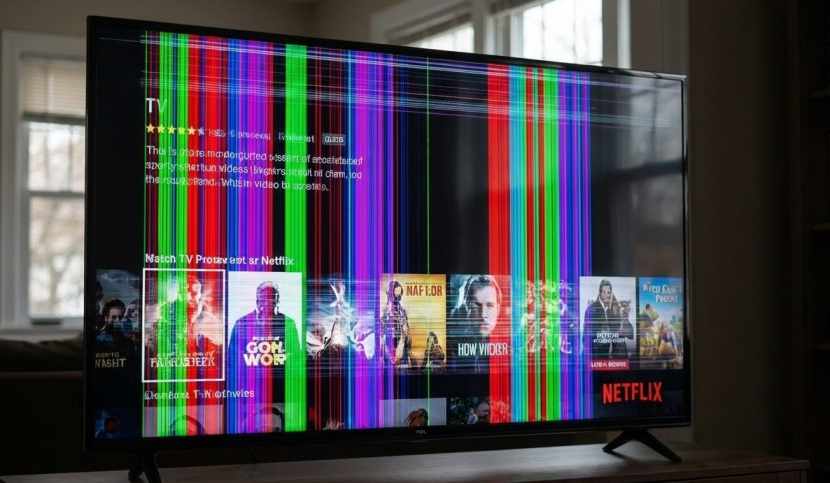
- Horizontal/vertical lines on screen (panel damage)
- Complete blackout but sound working (backlight or power board failure)
- Slow brightness dips every few seconds (likely auto-brightness sensor — not a problem)
Why is my TV screen flickering intermittently? Intermittent flickering means a component is aging or a connection is loose — it comes and goes as temperature changes. This is actually common and often fixable. The problem: intermittent flickering frequently becomes constant within weeks if ignored, so early action saves money.
In Agra, flickering often starts suddenly after monsoons, power cuts, or thunderstorms. Our local power infrastructure experiences more voltage fluctuations than metro cities, putting extra stress on TV power supplies. This is why stabilizers are essentially maintenance, not luxury items.
Symptoms & Quick Checks You Can Do at Home
Identify Your Flickering Pattern
Pattern 1: Constant Flickering (Flickers from power-on)
- Never stops or gets better with warm-up
- Likely causes: Loose cable, power supply issue, external device interference
- DIY success rate: 60–70%
Pattern 2: Intermittent Flickering (Comes and goes)
- Works fine for minutes, then flickers randomly
- May stop if you wiggle cables or move objects
- Likely causes: Loose internal connection, overheating
- DIY success rate: 40–50%
Pattern 3: Flickering After Warm-Up (Starts after 15–30 minutes)
- TV works perfectly when first turned on, then flickers as it heats
- Strong sign of overheating or failing power component
- DIY success rate: 50–60%
Pattern 4: Flickering Only with One HDMI Input
- Flickers only with set-top box or specific device
- Works fine with other devices or channels
- Cause: That external device is faulty, not your TV
- DIY success rate: 80%+
Safe Checks (Do These in Order)
CHECK 1: Power Cycle + Cable Reseat (5 minutes)
This fixes 30% of flickering problems:
- Unplug TV from wall and wait 60 seconds (discharges capacitors safely)
- While waiting, hold the physical TV power button (not remote) for 15 seconds
- Check every cable: HDMI, power, antenna — look for loose connections or bent pins
- Reseat each cable firmly — unplug and replug with a deliberate click
- Plug TV back in and test
If flickering is gone, you’ve solved it. If it returns regularly, move to Check 2.
CHECK 2: Test Different HDMI Ports and Devices (3 minutes)
How do HDMI cable quality and compatibility affect screen flickering? Poor HDMI signals cause flickering.
- Unplug the device causing flickering (set-top box, gaming console, etc.)
- Try a different device (phone via HDMI adapter, Blu-ray, etc.) in the same HDMI port
- If the new device works fine, the original device is faulty (not your TV)
- If the new device also flickers, try the original device in a different HDMI port on your TV
- If flickering stops in a different port, that original HDMI port is faulty — use the working port going forward
Pro tip: Use certified High-Speed HDMI 2.0 cables (₹300–₹800). Cheap cables degrade and send weak signals.
CHECK 3: Test Your Home’s Electrical Power (5 minutes)
What electrical issues commonly cause TV screen flickering? Unstable outlets are often the culprit.
- Unplug your TV
- Plug in a trusted device (lamp, phone charger, fan) into the same outlet
- Observe: Does the lamp brightness fluctuate? Does the fan speed vary?
- If yes, that outlet has voltage problems — try your TV in a different room’s outlet
- If flickering stops, your original outlet is unstable. Call an electrician, or use a voltage stabilizer for your TV
This is critical in Agra, where shared transformers and aging wiring create frequent voltage dips.
CHECK 4: Clean Vents and Improve Ventilation (10 minutes)
Does flickering start after 15–30 minutes of use? Overheating is likely.
- Unplug TV
- Gently wipe vents (sides and back) with a soft, dry cloth — never use compressed air blowing directly in
- Ensure 15 cm clear space on all sides — no blocked vents, no objects on top
- Never place TV in: direct sunlight, enclosed cabinets, on other heat-generating devices, against walls
- Leave unplugged for 30 minutes, then test
Dust buildup blocks airflow, causing overheating. Overheating makes loose connections worse and accelerates component aging.
CHECK 5: Adjust Picture Settings (5 minutes)
Can adjusting TV refresh rate settings solve screen flickering?
- Go to Settings > Picture (or Display)
- Look for “Refresh Rate” or “Scanning Frequency”
- Try switching from 50Hz to 60Hz (or vice versa)
- Try switching “Picture Mode” from “Dynamic” to “Standard” or “Cinema”
- Try “Game Mode” if available
- Leave the new setting for 5 minutes and observe
Sometimes external devices send signals at a different refresh rate than your TV expects. Matching them stops the mismatch flicker.
CHECK 6: Update Firmware (5 minutes if Wi-Fi available)
- Connect TV to Wi-Fi
- Go to Settings > Support > Software Update
- Install any available update and let it restart
- Check for flickering improvement
Manufacturers patch bugs with updates — flickering is often a known issue fixed by firmware updates.
CHECK 7: Install a Voltage Stabilizer (One-time, ₹4,000–₹8,000)
Can installing a voltage stabilizer help with intermittent TV flickering? This is the Ravi Electronics recommendation for Agra homes.
- 43-inch TV: 3-ampere (3A) stabilizer
- 55-inch TV: 4A stabilizer
- 65″+ TV: 5A+ stabilizer
Trusted brands: V-Guard, Microtek, Nextron
A stabilizer smooths voltage spikes and dips before they reach your TV. This prevents flickering from recurring and is the best single investment for Agra. One prevented repair pays for it.
❌ What NOT to Do
- Don’t open the back panel — dangerous voltage inside, even when unplugged
- Don’t use compressed air blowing directly into vents
- Don’t spray water or cleaners near the TV
- Don’t replace internal parts (LEDs, capacitors, boards) without training — can permanently damage the display panel
If none of these checks fix it, a component inside has likely failed. Call Ravi Electronics — professional diagnosis is needed.
Common Causes Explained Simply
Power Supply Failures (Most Common in Agra)
Your TV’s power supply is like the heart of the system — it pumps steady electricity to all internal components. When voltage from the wall fluctuates — which happens constantly in Agra due to shared transformers, monsoons, and aging electrical infrastructure — the power supply struggles to compensate, causing the backlight to flicker.
Why Agra is vulnerable: Our local power infrastructure experiences ±10–15% voltage fluctuation (developed countries: ±5%). Every fluctuation stresses your TV’s power supply. Over time, small components called capacitors inside the power board bulge and leak, eventually failing and causing permanent flickering.
Solution: A voltage stabilizer filters out these fluctuations before they reach your TV. It’s preventive maintenance, not luxury.
Loose Internal Connections
Inside your TV, ribbon cables link the power board, main board, T-Con board (display controller), and LED backlight. If these loosen from vibrations, moving the TV, or age, the signal becomes weak and intermittent — flickering.
This often happens after: Moving the TV, slight drops or bumps, vibrations from loud speakers nearby, or simply age.
Good news: If it’s just a loose connection, a technician can reseat it in 15 minutes for ₹500–₹2,000.
LED Backlight Aging
LEDs behind your screen provide the light. They have a finite lifespan: 30,000–60,000 hours (8–15 years with normal use). In Agra’s heat, this lifespan shortens significantly.
As LEDs fail, they flicker unevenly, creating intermittent flickering or dimming patterns. This is more common on TVs older than 5–7 years.
Do the flashlight test in a dark room: Shine a flashlight at an angle across a flickering screen. If you see a faint ghostly image, the backlight is failing (LEDs dying) but the panel is okay. If you see nothing, the panel might be faulty.
T-Con Board Faults
The T-Con board (Timing Control) sends signals telling every pixel when to light up and what color to display. If it fails — usually from power surges or heat damage — it sends jumbled signals, causing flickering.
Most common trigger: Voltage spike during thunderstorms. A single surge can instantly damage this board, creating flickering that appears suddenly.
Prevention: Use a surge protector (₹300–₹800). During monsoons, unplug your TV if possible.
External Devices Sending Bad Signals
How do external devices connected to TV cause screen flickering? Older set-top boxes, faulty gaming consoles, or cheap HDMI cables send weak signals. Your TV displays what it receives — if the signal flickers, the picture flickers.
Test: Connect a different device to the same HDMI port. If it works fine, the original device is faulty.
When to Stop DIY and Call a Professional
Call immediately if:
- Flickering is accelerating — was occasional, now constant
- Screen goes black but sound works — backlight or T-Con board failure
- Burning smell or smoke — unplug immediately, this is dangerous
- Flickering appeared suddenly after a power cut or storm — likely power surge damage
- Physical damage visible on screen (cracks, dents, discoloration)
- Flickering with loud buzzing sound — component failing
At Ravi Electronics, we diagnose the exact issue with no diagnostic charge. You get a transparent quote before we begin any repair, with a 1–3 month warranty on all repairs.
How to Prevent Flickering (7 Essential Steps)
1. Install a Voltage Stabilizer (Top Priority)
This is non-negotiable in Agra. Power fluctuations happen constantly. A ₹5,000 stabilizer prevents ₹15,000+ in repairs.
2. Use a Surge Protector Power Strip
Adds another layer of defense. Cost: ₹300–₹800. Essential during monsoon season.
3. Ensure Proper Ventilation
15 cm clear space on all sides, never in direct sunlight, never in enclosed cabinets. Poor ventilation causes overheating, which triggers flickering.
4. Clean Vents Regularly
Every 2–3 months, gently wipe vents with a soft cloth. Dust buildup blocks airflow in Agra’s dusty climate.
5. Use High-Quality HDMI Cables
Invest in certified High-Speed HDMI 2.0 cables (₹300–₹800). Replace damaged cables immediately. Cheap cables degrade and send weak signals.
6. Update Firmware Quarterly
Check Settings > Support > Software Update for available updates. Manufacturers fix bugs through firmware patches.
7. Schedule Annual Professional Checkups
Cost: ₹500–₹1,000. A technician can catch early component failure signs before they become expensive repairs. Especially important before monsoon season.
Frequently Asked Questions
Why is my TV screen flickering intermittently?
Intermittent flickering usually means a component is aging or a connection is loose. Causes include aging capacitors in the power board, loose ribbon cables, overheating, or failing LED backlights. Intermittent flickering often becomes constant over time, so act quickly.
What are the common causes of TV screen flickering in LED TVs?
Top 5: (1) Power supply issues from voltage fluctuations, (2) Loose internal connections, (3) LED backlight aging, (4) T-Con board damage, (5) External devices sending bad signals. In Agra, power supply issues are #1 due to frequent voltage fluctuations.
Can a faulty power adapter cause TV screen flickering?
Modern TVs don’t have detachable power adapters, but a faulty built-in power supply board absolutely causes flickering. This is one of the most common causes. The power board regulates voltage throughout the TV — if damaged, the backlight flickers.
Can power surges cause TV screen flickering and how to prevent it?
Absolutely. A single voltage spike during a thunderstorm can instantly damage the power board or T-Con board, creating flickering that appears suddenly. Prevention: (1) Use a surge protector (₹300–₹800), (2) Install a voltage stabilizer (₹4,000–₹8,000), (3) During storms, unplug your TV if possible.
How do software updates affect TV screen flickering problems?
Software updates patch bugs, including flickering issues caused by processor glitches or refresh rate errors. Updating firmware is quick (5 minutes) and worth trying before calling a technician.
Can adjusting TV refresh rate settings solve screen flickering?
Sometimes. If flickering appears only with certain devices, it might be a refresh rate mismatch. Try switching between 50Hz and 60Hz in picture settings, or switching picture modes (Dynamic to Standard). If flickering improves, you’ve found the issue.
Is screen flickering covered under standard TV warranties in India?
Flickering from manufacturing defects is typically covered in Year 1. Flickering from external factors (power surges, physical damage, poor ventilation) usually isn’t covered. Check your warranty document or contact the manufacturer.
How to perform a factory reset to fix TV screen flickering?
Only reset picture settings, not the entire TV. Go to Settings > Picture Settings and try switching between modes (Dynamic, Standard, Cinema) or changing refresh rate from 50Hz to 60Hz. If flickering improves, a settings mismatch was the issue. Don’t do a full factory reset — it erases apps and data.
Can firmware updates from manufacturers fix TV screen flickering?
Yes. Go to Settings > Support > Software Update. If an update is available, install it. Manufacturers identify bugs and release updates that fix flickering. This is worth trying before calling a technician.
What electrical issues commonly cause TV screen flickering in households?
(1) Shared electrical circuits with multiple high-power devices, (2) Loose wiring in electrical panels or outlets, (3) Faulty transformers, (4) Monsoon-season power surges (very common in Agra), (5) Frequent power cuts. In Agra, these issues are more common than in metro cities.
How do voltage fluctuations in Indian homes impact TV screen flickering?
Indian electrical infrastructure — experiences more fluctuations than developed countries: ±10–15% is common here vs. ±5% in developed countries. Your TV’s power supply constantly adjusts to these changes, causing wear and triggering flickering. A voltage stabilizer protects against this stress.
Final Takeaway
TV screen flickering is fixable. 70% of cases are solved with safe home checks (cable reseat, ventilation, settings). Even hardware failures are repairable with affordable component replacement.
Your next step:
- Have 1 hour? Try the 7-step DIY troubleshooting guide. Most fixes are simple.
- Don’t have time? Contact Ravi Electronics in Agra for same-day home diagnosis with no charge. Transparent quote before any repair. All major brands supported — LED, LCD, Smart TV.
Most important prevention: Install a voltage stabilizer. this single investment (₹4,000–₹8,000) prevents ₹15,000+ in repairs and keeps your TV running smoothly for years.
Agar aapki TV ka screen flicker kar raha hai, Ravi Electronics ko aaj hi call karein. Same-day service, repair warranty, aur Agra-specific expertise.
Ready to fix your flickering TV? Contact Ravi Electronics today for a free inspection and transparent quote.